
Jack's
Jack's Family RestaurantsFood & Drink
3.51.27K Reviews
- Version
- 2.9
- Installs
- 100.00K
- Age Rating
- Everyone
Screenshots

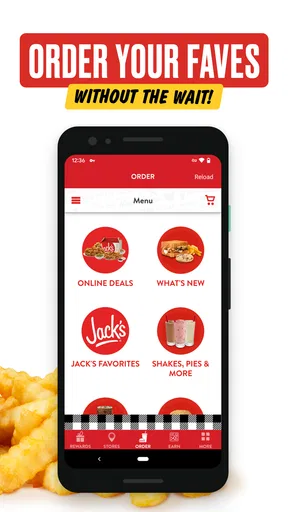
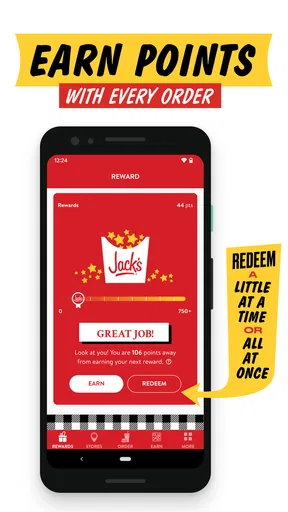
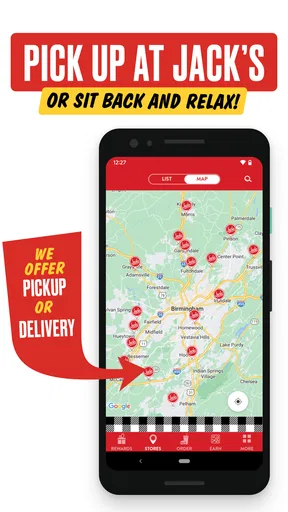
Our Review of Jack's
 Analysis by Appyee
When I want a quick meal from Jack’s Family Restaurants, the useful question is not whether a restaurant app can replace every food-ordering service. It cannot. The better question is whether Jack’s makes a familiar visit easier from the moment I decide what to eat until I reach the counter or drive away. After spending time with Jack's, I found a straightforward Food & Drink app that works best for people who already choose Jack’s and want a more convenient way to stay connected with the restaurant.
The app is free, aimed at Everyone, and comes from Jack’s Family Restaurants. Its focus is deliberately narrow: it is a direct companion for the Jack’s experience rather than a broad marketplace covering many restaurants. That narrow focus is both its main strength and its first limitation. If Jack’s is already part of your routine, the app has a clear reason to stay on your phone. If you are looking for a universal delivery tool, a restaurant comparison service, or a way to discover countless local places, you will probably get more from another type of app.
From deciding on lunch to finishing the visit
I’ll follow the visit from the first lunch decision through the restaurant handoff, with an eye on where a little preparation can save time and where the app should remain only one part of the plan. I’ll also look at the moments when using it under pressure may be less practical, so the next section can weigh convenience against real-world reliability.
The starting condition: a quick decision, not a research project
My most realistic use case is a busy lunch break. I already know I want Jack’s, I do not want to spend several minutes searching through unrelated restaurants, and I would rather prepare before joining the queue. In that situation, opening the official app makes more sense than opening a general food platform and filtering through restaurants I am not considering.
The first thing to understand is the role of the app. The store summary describes it as a way to join the Jack’s family, but in practical terms I see it as a brand-specific starting point. It keeps the decision centered on Jack’s instead of turning lunch into a comparison exercise. That can feel pleasantly simple when the choice is already made.
It is also worth checking the basic compatibility before planning around it. The current version is 2.9 and it requires operating system version 10 or later. That is not an issue for many recent phones, but anyone using an older device should check the system version first. A free app is only useful if it can actually be installed and opened on the phone you carry every day.
The app has passed the early adoption stage rather than being an obscure experiment: it has more than a hundred thousand installs, along with an average rating of 3.5 from around three thousand ratings. I read that combination as a reason to keep expectations practical. There is enough usage to suggest that the app serves a real audience, but the rating also tells me not to assume every visit will feel perfectly smooth on every device or in every situation.
Step one: opening the official route
Once I open the app, the benefit of using an official restaurant tool is that I am starting with Jack’s own presentation rather than a third-party interpretation. That matters when I want the restaurant’s current path to its food experience, rather than a mixture of delivery listings, sponsored placements, and unrelated alternatives.
My advice is to open it before you are standing in a crowded restaurant or waiting at a drive-through speaker. That small change improves the whole workflow. A few seconds spent checking the app while I am still at home or parked safely gives me time to read, decide, and handle any sign-in or loading delay without holding up the people behind me.
This is one of the app’s less obvious practical lessons: the best time to use it is before the handoff, not during it. Many restaurant apps are judged at the counter, but that is where even a minor delay becomes noticeable. Used earlier, the app can support the visit. Used at the last possible moment, it can become another thing competing for attention.
Step two: turning a craving into a clear order
The next part of the journey is choosing what I actually want. Jack’s is a familiar fast-food destination, so I do not need a complicated planning tool. I need a clear route from browsing to a decision. The app’s value here is less about endless customization and more about keeping the restaurant’s choices in one place.
I prefer to make the final decision before reaching the restaurant. That avoids the common problem of trying to remember a meal, a drink, and any changes while a cashier is waiting. It also helps when I am ordering for another person. Instead of passing a phone around at the counter, I can settle the details first and then communicate one concise request.
For families, this preparation step is especially useful. One person can check the available choices while another gathers the children or gets the car ready. The app does not need to become a shared planning platform to help; simply having the restaurant’s information available before the trip can reduce the small misunderstandings that make a quick meal feel less quick.
Still, I would not treat the screen as the final authority for every in-person detail. Restaurant menus and availability can depend on the location and the moment. My practical approach is to use the app to narrow the choice, then confirm anything important with the restaurant when the order is handed over. That is particularly sensible when a substitution or dietary concern matters more than speed.
Step three: preparing for the handoff
The handoff is where the app’s usefulness meets the real world. A phone screen can help me decide, but the meal still has to move from Jack’s staff to me. That may happen at a counter, through a drive-through, or through whatever ordering path the selected restaurant supports. The app should therefore be viewed as one part of the visit, not as a guarantee that every step happens inside the phone.
I find it helpful to keep the practical details separate in my head. The app handles the digital preparation; the restaurant handles the physical fulfillment. That distinction prevents a common disappointment: assuming that installing an official app automatically means every location, order type, payment step, and pickup arrangement will behave like a large delivery marketplace.
If I am using the app while traveling, I would double-check the chosen Jack’s location before setting off. A familiar brand does not remove the need to make sure I am heading to the right restaurant. This is a small but important handoff between the app and my own planning. The app can guide the decision, but I still need to confirm where the actual meal will be collected.
For a drive-through visit, I would use the app while parked rather than while driving. That sounds obvious, but it is exactly the kind of everyday detail that determines whether a restaurant app feels convenient or distracting. Prepare the order, put the phone away, and then use the restaurant’s normal process to complete the purchase.
What the result feels like when everything lines up
When the workflow goes well, the result is modest but useful: I spend less time deciding at the restaurant, I arrive with a clearer idea of what I want, and the visit feels more organized. That is the right standard for Jack’s. I do not need it to transform a fast-food stop into a sophisticated dining platform. I need it to remove a little friction from a meal I was already planning to buy.
The strongest audience is therefore easy to identify. Regular Jack’s customers can benefit from having a direct digital starting point. Families may appreciate making choices before leaving home. Someone with a short lunch break can use the app to reduce indecision. A person who prefers official restaurant channels over broad delivery services may also like the focused experience.
The benefit is less compelling for occasional visitors who are still deciding between several chains. In that case, a general map, restaurant discovery tool, or delivery marketplace may be more useful because it helps compare options. Jack’s is not the right first download when the real problem is deciding where to eat.
The trade-off versus general food apps
Compared with a large food-ordering platform, Jack’s feels more focused and less cluttered by unrelated restaurants. That focus can make the path easier when I have already chosen Jack’s. I am not distracted by competing menus, delivery listings, or restaurants that do not fit the plan.
The trade-off is breadth. A general service is usually the better tool when I want to compare prices, cuisines, delivery choices, or restaurants in one search. It may also fit better when several people are ordering from different places. Jack’s makes more sense when the group has already agreed on Jack’s and the remaining task is getting through that specific restaurant’s process.
Compared with simply walking into Jack’s without using an app, the digital route can improve preparation but adds another step. I have to open the app, wait for it to load, and possibly deal with the phone before I even leave. For a very simple order at a quiet location, that may be unnecessary. The app earns its place when planning, menu checking, or coordination is more valuable than absolute simplicity.
Three practical habits that make it more useful
My first tip is to use it as a pre-visit checklist rather than a counter-side rescue tool. Decide what you want before arriving, especially when ordering for more than one person. This keeps the physical handoff short and gives you a chance to notice anything that needs clarification.
My second tip is to separate “information I can prepare” from “details I should confirm.” The app can help organize the meal choice, while the restaurant remains the place to verify anything that affects the final handoff. This approach avoids treating a digital menu as a promise that every item or option will be identical at every moment.
My third tip is to keep an alternative plan for time-sensitive meals. If the app is slow, the connection is poor, or the restaurant is unexpectedly busy, do not let the digital step delay the entire lunch. A useful restaurant app should support the visit, not become a reason to miss an appointment. Having the ordinary counter or drive-through process in mind makes the experience more resilient.
A fourth habit is useful for families: make one person responsible for the final order summary. Multiple people changing choices at the last second creates more confusion than the app can solve. I get better results when the app is used to collect preferences early, followed by one clear handoff to the restaurant staff.
Where the flow breaks down
The biggest weakness is the narrow scope. Because this is Jack’s own app, it is naturally most valuable inside the Jack’s ecosystem. If I want to search across restaurants, coordinate a mixed order, or compare several delivery possibilities, I need a different tool. Installing this one will not solve those broader needs.
There is also a gap between digital confidence and physical certainty. Even when the app helps me prepare, the final meal still depends on the restaurant visit and the details of that location. That means I should not confuse a smooth screen experience with a guaranteed faster handoff. The app can reduce decision friction, but it cannot remove every operational variable at the restaurant.
The rating of 3.5 is another reason I would recommend a measured trial rather than making it central to every meal plan. A middling average does not tell me that the app is unusable; it tells me that the experience may be uneven enough for some users to notice problems. I would install it, try it on a normal visit, and decide whether its convenience outweighs the extra digital step on my own phone.
People with older devices should also pay attention to compatibility. The minimum operating system requirement is version 10, so an older phone may be excluded even though the app itself is free. That is a simple check, but it matters if you are downloading it just before a planned meal.
Who should use it, and who should skip it
I would recommend Jack’s to regular customers who want a direct way to prepare for a Jack’s meal, especially when they are ordering for a family or working within a short break. It is also a sensible choice for anyone who prefers a focused restaurant app instead of a crowded multi-restaurant service.
I would skip it if I rarely visit Jack’s, if I mainly need restaurant discovery, or if I want one app to manage orders from many different chains. I would also avoid relying on it as the only plan for a tightly timed trip until I had tested how well it fits my local routine. The app is most convincing when it complements a habit that already exists.
For me, the final judgment is positive but specific. Jack's works best as a preparation tool for a Jack’s visit, not as a universal food-ordering replacement. Its free access lowers the risk of trying it, and the connection to Jack’s Family Restaurants gives it a clear purpose. The current version, 2.9, shows that it is an actively maintained part of the brand’s digital presence, while the moderate rating reminds me to keep expectations realistic.
If Jack’s is already the answer to “what are we eating?”, this app can make the next steps more orderly: check the choices, settle the plan, arrive prepared, and complete the handoff with fewer last-minute decisions. If the real question is “which restaurant should we choose?”, I would use a broader alternative instead. That distinction is what makes the app worthwhile for the right person and easy to pass over for everyone else.
Verdict
Strengths of Jack's
- Simple interface makes ordering quick and easy.
- Menu offers convenient options for casual meals and snacks.
- Useful for checking available food before visiting a location.
- Lightweight app that generally works well on supported devices.
- Can help users save time when planning a quick meal.
Limitations of Jack's
- Availability and features may vary by location.
- Some menu items or prices may not be updated immediately.
- Requires internet access for the best experience.
- Limited value for users who rarely visit Jack's restaurants.
- Promotional offers may include restrictions or expiration dates.
Similar Picks in This Category
View All
Rappi: Food Delivery, Grocery
Rappi, Inc - Delivery3.5

McDonald’s: Cupons e Delivery
Arcos Dorados4.3

Swiggy: Food Instamart Dineout
Swiggy4.7

Blinkit: Groceries & more
Blinkit4.8

foodpanda: food & groceries
Foodpanda GmbH a subsidiary of Delivery Hero SE4.0

Zomato: Food Delivery & Dining
Zomato4.7
Frequently Asked Questions
What is Jack’s, and what can I use it for?
Jack’s is a mobile application designed to give users convenient access to the brand’s products, services, offers, and account-related features from an Android or iOS device. After installing it, you can typically browse available options, review details, find nearby locations or services, and stay informed about promotions. The exact features may vary depending on your country, device, and the current version of the app.
Is Jack’s free to download and use?
Jack’s can generally be downloaded without an upfront charge from the official Google Play Store or Apple App Store. However, some services, purchases, delivery options, subscriptions, or special promotions accessed through the app may involve additional costs. Before confirming an order or payment, carefully review the displayed prices, fees, taxes, and terms. Mobile data charges may also apply when using the app away from Wi-Fi.
Do I need to create an account to use Jack’s?
Some Jack’s features may be available without registration, such as browsing information, menus, products, or store details. An account may be required for functions such as placing orders, saving preferences, joining a rewards program, viewing order history, or receiving personalized offers. If registration is necessary, the app may request basic personal information and account credentials. Use a strong password and review the privacy policy before signing up.
Does Jack’s support mobile ordering, payments, or rewards?
Depending on the version available in your region, Jack’s may include features such as mobile ordering, digital payments, loyalty rewards, coupons, or promotional deals. Availability can differ by location and participating stores, so not every user will see the same options. Before relying on the app for a purchase, check whether your preferred location supports mobile orders and which payment methods, rewards, and offers are currently accepted.
What permissions and personal information does Jack’s require?
Jack’s may request access to information such as your email address, phone number, location, device notifications, or payment details, depending on the features you use. Location access can help identify nearby stores, while notifications may deliver order updates or promotions. You can usually manage permissions through your device settings. Before downloading, review the app’s store listing and privacy policy to understand how information is collected, used, stored, and shared.
